

Personal Tax- Edit/delete client Repayment claim on TR5/TR6 for one client only?
Article ID
ias-12030
Article Name
Personal Tax- Edit/delete client Repayment claim on TR5/TR6 for one client only?
Created Date
13th October 2015
Problem
Personal Tax- To enter repayment details or if the option to claim a repayment has been un-ticked but IRIS is still putting details into question 19 of the Self Assessment Tax Return.
Resolution
There are two methods to claim repayment 1) This KB for individual clients, 2) The other KB here for all clients
To complete the repayment claim on the SA100/TR5 or 6 tax return for the selected client only. Note: If data is entered manually here then it will override any automatic option entered under Setup/Repayment Claims.
1. Log into Personal Tax and select the relevant client.
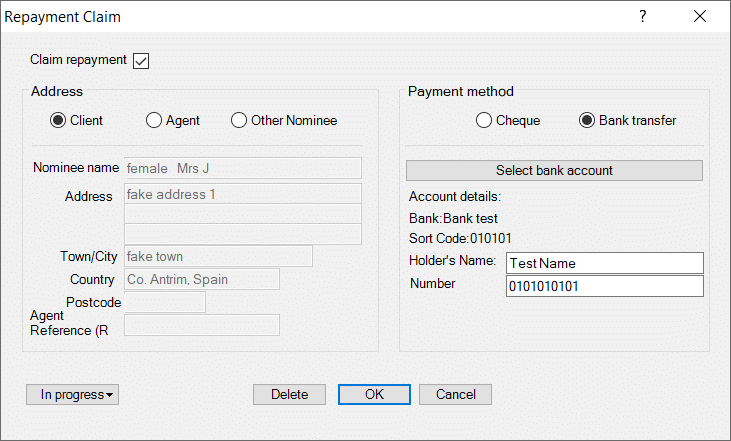
2. Click on the Relief’s tab, then click on the yellow folder labelled Miscellaneous then click on the Repayment Claim option.
3. Complete the sections/fields. If you need to enter Bank etc details- click ‘Select Bank account’.
4. If you need to delete then click the ‘Delete’ button and click Yes to the prompt stating “Delete Repayment Details”.
5. If question 19 is still being completed after following the above steps please check the global settings via the Toolbar – Setup | Repayment Claim OR if you need to complete the repayment for all clients. See the KB link here
6. If you cannot enter HOLDERS NAME field (it wont recognise any entry) – then use DELETE(see step4) and close. Restart Pt and go back in again and fill it in again.
6. The CLIENT option is ticked yet I cannot edit the address etc? The fields are greyed out because they are automatically set to the address under Client/View/ Address. So either go there and edit the address OR Click AGENT OR Click Other Nominee and fill in the fields.
We are sorry you did not find this KB article helpful. Please use the box below to let us know how we can improve it.