


Run time error 6 – Overflow – Entering dates for employee leave.
Article ID
11789
Article Name
Run time error 6 – Overflow – Entering dates for employee leave.
Created Date
1st January 2019
Problem
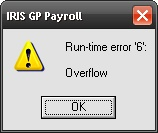
When trying to save leave dates for an employee (ie Sick, Maternity, etc.) user gets the error:
Resolution
This error is caused when one or more of your PC regional and language setting are not set correctly to UK format.
Go to “Control Panel” > “Regional & language settings”
Work through the options and make sure everything is set to “English (United Kingdom)” specifically the “Short Date Format” should be set to dd/MM/yyyy.
We are sorry you did not find this KB article helpful. Please use the box below to let us know how we can improve it.