


How to republish pension letter via OpenEnrol
Article ID
12076
Article Name
How to republish pension letter via OpenEnrol
Created Date
13th September 2016
Problem
How do I republish pension letters for individual employees?
Resolution
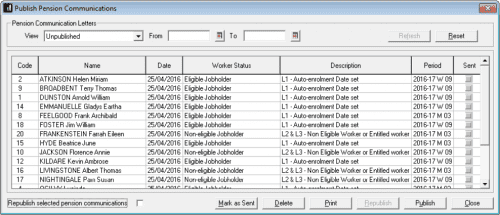
To republish only for selected employees:
- On the Publish Pension Communications screen, In the View drop down, select Published, then click Refresh
- Tick the Republish selected pension communications box
- Hold down the CTRL key and click on each employee you wish to republish
- Click the Republish button
We are sorry you did not find this KB article helpful. Please use the box below to let us know how we can improve it.