


Personal/Business/Trust Tax: How to password protect a client?
Article ID
personal-business-tax-how-to-password-protect-a-client
Article Name
Personal/Business/Trust Tax: How to password protect a client?
Created Date
24th September 2021
Problem
Personal or Business Tax: How to password protect a confidential client so users cannot access the account
Resolution
1.Load the client in PT or BT or TT
2.Client and View
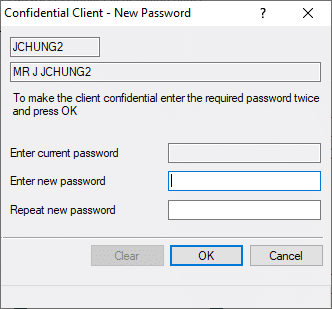
3. Advanced ad then Confidentiality (if you need to remove the password – click CLEAR)
4. Enter password and Ok. Whenever anyone loads this client – it will ask for the password.
If you get a warning when trying to reset a password for a confidential client then read this KB
Note: If client is password protected, then BT will not pick it up the IXBRL automatically from AP. The IXBRL has to be attached manually in BT when generating the tax return.
We are sorry you did not find this KB article helpful. Please use the box below to let us know how we can improve it.