


Personal Tax- SA105 adjusted profit/loss for the period must equal the sum of SA105 (PRO11.1 furnished holiday lettings etc) 3001 8290
Article ID
personal-tax-sa105-adjusted-profit-for-the-period-must-equal-the-sum-of-sa105-pro11-1-furnished-holiday-lettings-etc
Article Name
Personal Tax- SA105 adjusted profit/loss for the period must equal the sum of SA105 (PRO11.1 furnished holiday lettings etc) 3001 8290
Created Date
16th July 2021
Problem
Iris Personal Tax- Adjusted Profit year -validation SA105 adjusted profit/loss for the period must equal the sum of sa105 (PRO11.1 furnished holiday lettings etc) 3001 8506
Resolution
For example it could look like this or has less text especially if it mentions ‘SA105 Profit OR Loss, must equal sum and PRO. It may also show as Furnished Holiday Lettings – the sum of SA105 FHL etc


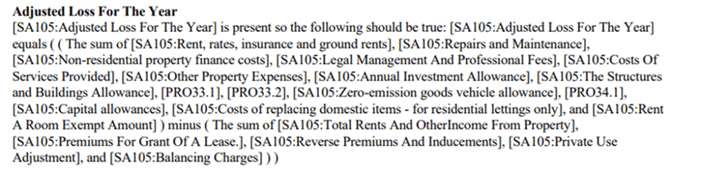


HMRC rules are being applied and you need to check all entries under UK Property and Foreign Property:
1) You cannot have negative expenses, remove them. As there is no box on the SA100 for negative expense values, you will need to contact HMRC support on where they recommend where to show on the SA100.
2) If you have Foreign tax paid BUT the property was already in loss – you cant increase the loss by this tax paid – so remove the tax paid.
3) Adjust the value in expenses for all properties so that they are rounded up or down to the nearest even number
4) If you have ‘Property Let joint’ split, for example of 33.3% split between several clients then this rounding of values of each expense can cause the issue. Do adjust the value in expenses for the property so that they are rounded up or down to the nearest even number. If that dosnt work, Remove the joint tick and change to 100%, then manually enter the income and expenses with the 33.3% adjustment so the profit on tax comp is the value you wanted.
5) If you have ‘Foreign tax paid‘, Foreign Tax Credit Relief (FCTR): If you do not claim ‘FCTR’ on the Foreign Property then this can trigger the SA105 issue. Please tick FCTR so it can be generated. If you do not want to tick FCTR then remove the tax paid value. If you want to declare Foreign tax paid then enter it under Reliefs/ Misc /Additional info/ SA100. If you then get a new error after ticked FCTR (Claim to FTCR amount chargeable) then read this KB
6) If you have a lot of Expenses and cannot find a issue – then note down the values/data and then delete all the expense entries for 1 property first. Then regenerate tax return – and check if the error appears. If its doesn’t then add back each expense one by one and use the Expense Type ‘Unspecified’.
We are sorry you did not find this KB article helpful. Please use the box below to let us know how we can improve it.