

Personal Tax- HMRC Data Retrieval ‘Matching Resource Not Found’
Article ID
personal-tax-hmrc-data-retrieval-matching-resource-not-found
Article Name
Personal Tax- HMRC Data Retrieval ‘Matching Resource Not Found’
Created Date
21st March 2022
Problem
IRIS Personal Tax - HMRC Data Retrieval 'Matching Resource Not Found'
Resolution
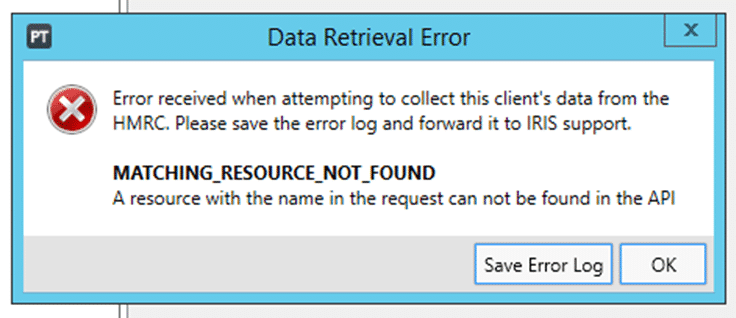
MATCHING RESOURCE NOT FOUND – When you access a clients trade and get a data retrieval error log with ‘Matching resource not found’. No quarterly obligation periods are listed under period settings. When you select ‘Retrieve periods from HMRC’ they just get another data retrieval error.
If you are using PT MTD to retrieve quarterly periods from HMRC – You will need to reset your ASA login under the Setup and Authorised Agent and look for the ‘Self Assessment’ row. Reset it , ok to close, retrieve the periods again and sign in with your ASA login. Fix: Users must ensure that the affected Client has been registered with HMRC for MTD and then the user has authorised the IRIS software using the ASA credentials before retrieving the obligation periods. If you still get the warning then contact HMRC support directly on this and speak to a senior as this warning is coming from HMRC.
NOTE: If you are trying to access eg 5th Apr 2025 period details but get the errors then it does not apply for it. You need to manually add the next period eg 5th Apr 2026 into PT and it will now work and not get the error and show all the periods. So add the next set of periods into PT and try again.
If its HMRC data retrieval (not MTD periods) which uses your HMRC credentials. Please follow the KB link below to fix it as that warning is linked to HMRC data retrieval:
We are sorry you did not find this KB article helpful. Please use the box below to let us know how we can improve it.