

Business Tax- Group Consortium cannot see and claim a loss. ‘Brought forward trading loss relief cannot exceed £0’ or No Profit/Loss
Article ID
business-tax-group-consortium-this-client-cannot-claim-any-amount-under-group-relief-provisions
Article Name
Business Tax- Group Consortium cannot see and claim a loss. ‘Brought forward trading loss relief cannot exceed £0’ or No Profit/Loss
Created Date
12th July 2022
Problem
IRIS Business Tax- Group Consortium: cannot see and claim a loss from a loss making company or you get this 'Brought forward trading loss relief cannot exceed £0'
Resolution
How to transfer a loss, read this KB
You have a loss making making company and want to transfer loss to another company with a gain. You are now on the company with the gain in BT and trying to transfer the loss to it but you get the error or missing values:
1.Warning: ‘This client cannot claim any amount under group relief provisions’
2. OR the loss value doesn’t appear / Group loss relief brought forward is not appearing
3. OR you get error ‘Brought forward trading loss relief cannot exceed £0’.
4. OR you get this validation: No Profit/Loss
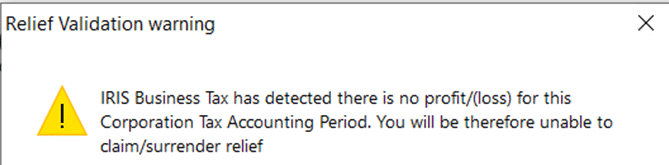
1.Double check the loss making company – run a tax comp to ensure it has a loss in Period or Loss Brought forward. This company may have been loss making initially but a update to values changed it to profit making.
2. Double check the profit making company – run a tax comp to ensure its profit making, This company may have been profit making initially but a update to values changed it to loss making. If 1 and 2 are correct then follow the steps below:
a. Load the loss making company
b. Edit losses
c. CTAP edit
d. Click on the very top left cell
e. Use the Tab key and along all the way around to you go back to where you started
f. Update totals and close
g. Now load the profit making company and go back to groups/consort screen and check that the loss value now shows which you can now claim.
3. Load the Group and consortium screen – check both tabs – is the STATUS and Name fields populated? if yes – delete them and Apply. Close screen and go back in – are the STATUS and Name fields repopulated again? if yes then BT still thinks its a loss making company and locks in the status/name fields – so continue below
a. If the company is now profit or £0 then go to Edit/postings- add a disallowed income posting entry and enter a value which forces a loss to show on the Tax Comp. Run Tax comp.
b. Load the Group and consortium screen – check both tabs – delete the STATUS and Name fields and Apply. Run the tax comp again
c. Go to Edit/postings- remove the fake loss disallowed income posting entry. Run the tax comp again to show it as non loss making
d. Now generate the CT600 as normal. BT just needs a refreshing of data to pick up the changes
We are sorry you did not find this KB article helpful. Please use the box below to let us know how we can improve it.