

Personal Tax- Making Tax Digital(MTD) and Quarterly Submissions 2024/25 onwards
Article ID
personal-tax-making-tax-digitalmtd-and-quarterly-submissions-2024-25-onwards
Article Name
Personal Tax- Making Tax Digital(MTD) and Quarterly Submissions 2024/25 onwards
Created Date
8th April 2025
Problem
IRIS Personal Tax- Making Tax Digital(MTD) and Quarterly Submissions for 2024/25 onwards for Sole Trade/UK Property and Foreign Property.
Resolution
For the operation of HMRC MTD and Quarterly Submissions 2024/25 in Personal Tax, go through these steps below;
For Q&A on MTD matters from 2026 onwards, please go here
For the ‘MTD insights’ pack which has videos and webinars on how to get it operating- go here
Quick guide on fixing ‘Missing Quarter periods’ and ‘Resource not matching’ pop up.
Making Tax Digital functionality has finally arrived, we have updated the Personal Tax product to enable you and your practice in preparation for the MTD pilot (April 2025). MTD functionality will run alongside the standard SA functionality and will simultaneously complete the clients SA return as well as giving the ability to complete in-year obligations where a client has been identified as MTD compliant. In this release of IRIS, we have delivered functionality which will enable you to complete the full end to end journey for individuals. The software will allow you to complete the in-year obligations associated with income sources which are required to be submitted quarterly, this will include sole trade, UK and foreign property Income. Additionally, the software facilitates the completion of the individual’s end-of-year financial position by submitting the final declaration to HMRC.
All MTD related submission will be channelled through the IRIS Digital Tax Hub, where the software will guide you through the MTD workflow, highlighting any outstanding tasks to simplify a complex MTD workflow.
This KB article covers the process of getting the periods to show and how to submit them to HMRC:
a. IRIS version 25.1.0 or later version is required to launch the HMRC MTD system (starting in 2024/2025)- Help and About to check and then update.
b. HMRC step: You need an ‘Agent Services Account’ created via the HMRC website (or we commonly use the term ‘ASA’ login). Your ASA allows the online interaction between your HMRC account and the IRIS PT. This ASA login is NOT the same login as your other HMRC ‘Agent credentials’ (which is used for BT/PT/TT submissions) and is the same as the ASA login used for the VAT filer. IRIS can only advise this ASA be setup, please contact HMRC support if you need help.
c. HMRC step: You need to move your PT clients to your ASA and sign them up for MTD on the HMRC site. If you do not move and register your clients then no quarterly periods will show for your client. Upon completion of your ASA and client setup to MTD, go below for the next steps needed in Personal Tax. IRIS can only advise this move/signup be completed, please contact HMRC support if you need help.
d. Affects specific Income types This is only required for PT clients with three types of income: Self Employment(Sole trade), UK Property and Foreign Property. Any income which is not the three types listed above do not need quarterly submissions and just require end of year submission online of January. Note: If you have a client with multiple sole trade businesses then each one needs its own quarterly submission. So for example if you normally have 1 sole trade= a minimum of 4 quarterly submissions are required, if 3 sole trades= 4+4+4 totaling 12 quarterly submissions are required etc. There is no mass submit tool for all sole trades. HMRC require a separate submission PER sole trade, see step 5). It is also the cumulative total of the three required incomes to meet the thresholds, see step e).
e. Thresholds of income requiring submission? HMRC have decided to time stagger out the release of quarterly submissions based on the clients income. If the total cumulative Income of trade and property falls within £1- £19,999 then HMRC do not require quarterly submissions and only require end of year submission as per original rules. Currently HMRC plan is income threshold £50K+ for April 2026, 30K-50K for April 2027, 20K-30K for April 2028(TBC). If the MTD quarters do not show for a client which falls into a income bracket (eg 50K for 2026) then contact HMRC and also check your ASA login and lookup the client to view any quarter deadlines.
f. Why it shows the same values on all periods and Reporting types of the quarters? In specific reports like the top of DTH, it will list the per quarters values as a cumulative total which include any prior quarters. This is by HMRC design. For example Quarter 1 income is £1000, Q2 income is £500, Q3 is £0 and Q4 is £0. When you run certain reports which lists the 4 quarters it may show as £1500, rather then £1000 for 1st and £500 for 2nd. So if you only enter for Q1,this value will appear on Q2/3/4 as well. Only specific reports will use the cumulative totals.

NOTE: there is a known visual issue where Q1 data only shows under Q1 and is omitted from Q2/3/4 (as it should be a cumulative value on all 4Qs). This is to be fixed in the early Aug 2026 26.2 update. You can still submit the Q1 as it is.
g. How to input/import values? In 2025 you may still manually enter Income/expenses etc into PT. However in 2026 users of PT can ONLY IMPORT the Income/expenses etc into PT from a CSV file for property, if a sole trade it will only allow CSV import if the 4 quarters periods appear. You cannot manually enter in the values anymore as the income and expenses etc boxes will be greyed out.
In Personal Tax, if you have completed the HMRC steps B) and C) above.
1.Load PT and the client which you agreed to run quarterly returns for them and select the relevant Tax Year (See the NOTE below). Go to Administration and Edit Tax Return dates. In the ‘Registered for MTD’ field, enter the date (tick the box if you need to edit the date, once saved this box will untick itself). OK. This DATE is required to work with MTD and triggers any requirement to sign in to HMRC (if its wasn’t done before). Warning: If you have a date entered here, whenever you try and access trades and property screens; it may load the HMRC login screen or you get a ‘Client or agent is not authorised’ warning. This is because PT is now trying to automatically link to HMRC to allow quarterly returns – you can either read the rest of this KB to set up your ASA correctly OR remove the date under ‘Registered for MTD’ field (keep that date saved outside of IRIS) which stops the link to HMRC.
Note: Only enter a MTD registration date in the ‘correct Tax Year‘. For example a date of 05/04/2026 should only be entered in the 2027 tax year (and not 2026 tax year – at the very top of TP, find the year selector). If you enter the MTD reg date in the wrong tax year, it may lock out the income/expense boxes and stop all manual entries for the wrong tax year- see Point 8 further below.

2. A ‘HMRC Government gateway popup’ will show when you run actions in PT, eg accessing/run reports/open the relevant period etc. So login using your ASA login (This may also show on step5). It may also ask for security questions user Identity like passport etc about yourself as the PT user/accountant (and not your clients details). These are HMRC requirements (not IRIS) which you must answer to proceed, if you have any issues with a question or cannot get to work then contact HMRC support and state you are trying to answer a security question on your ASA login but you get a issue.
This HMRC pop up will normally show when you have not already successfully signed in (do note HMRC may have arranged a ‘timer/countdown’ and require a reset every year/6months etc to ensure you login again with your ASA login).

3. Go to Setup/Authorised Agents – if step 2) is completed then your IRIS Initials will show under a row named ‘SELF ASSESSMENT’ (This is title used for MTD) with date (note this ‘date’ down). If this row ‘SELF ASSESSMENT’ is missing then MTD will not work and you need to go back to step 1) above and try again to sign in with your ASA login.
Note: Please do not use the ‘Agent services account sign up’ button but instead load your browser and onto the HMRC site using your ASA login if you need to make any checks/setup mtd clients etc.
If you need to reset/delete it: Click on the relevant ‘Self assessment’ row and click ‘reset agent credentials’ and ok to warning. It will be deleted, Ok to exit this screen and go to retrieve the quarter periods, the HMRC screen will show to allow you to login with ASA.

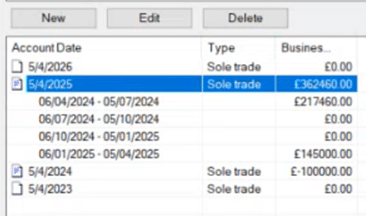
Trade Income: Close screen go to the TPV STP Summary screen, open the relevant Sole trade period. Go to the ‘Period settings’ tab. Click – ‘Retrieve periods from HMRC’. It may also request you login to HMRC here. If you have successfully registered – the 4 Quarter Periods will show on screen and which of the 4 periods have submitted or not. If the periods are missing, close and restart PT and check again. If still missing then can you create the next period if it havnt been created yet eg 05/04/2026 or 27 etc- open this new period, go to the ‘Period settings’ tab. Click – ‘Retrieve periods from HMRC’. Note: Sole trade quarters appear on the user created periods at the bottom of PT eg 05/04/2026 or 05/04/2027 etc.
If you get this pop up about ‘Unmatched record ‘– select the relevant sole trade name listed -and click OK

UK Property and Foreign Property income: This uses slightly different rules compared to Sole trader. Once signed in with ASA go to UK Property: UK Land and Property | UK Other Property Summary | Period Settings OR Foreign Property: Foreign | Foreign Other Property Summary | Period Settings. Click ‘Retrieve periods from HMRC’. The quarter periods should show. Note: Property quarters appear on the ‘TAX year’ at the top of PT and not the same as a trader periods.
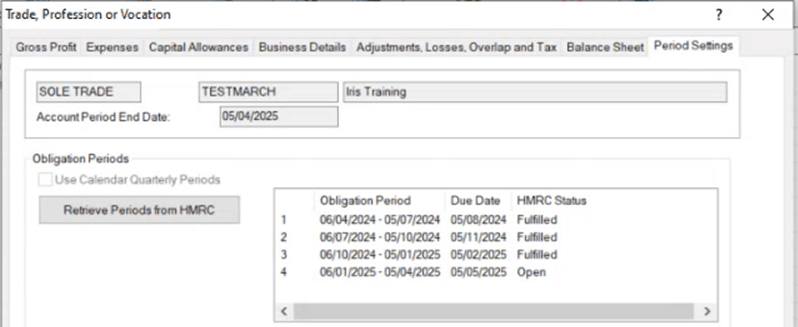
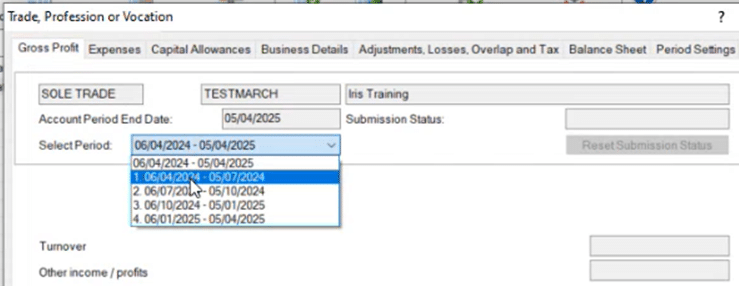
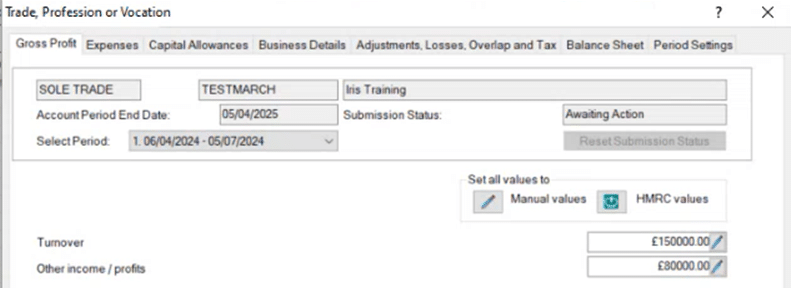
4. 2025 and before: Go back to 1st tab ‘Gross profit’– at the top on the ‘Select Period’ field, this can now be pulled down to list all 4 quarters – select the relevant quarter and manually enter income/expenses per quarter and save (In 2026 onwards: the manual entries will be locked out as HMRC require CSV importing of data). 2026 onwards: The ‘Select period’ will no longer appear, this option has been removed. It will only show the WHOLE period and you will only need to import income/expenses with dates. These entries will show correctly on the DTH screens per quarter.
Note: If you cannot see these options on your client then its now enforced a ‘import of values’ method and not manual entries (see step 5 and step 8 and use the ‘Digital Tax Hub’ to view/access the quarters etc)
5. Back to the main PT screen, on the TOP RIGHT click the icon: ‘Digital Tax Hub’ and it will try and link this client to the HMRC system (it may ask you to login here as well, see step 2 above).
This example is for Sole Traders: on the TOP LEFT, place your cursor over the Sole Trade/’client name’ and it will list the sole trades and allows you to select the ‘Self employment’ business name, if multiple businesses then select the specific name. It will then load in the Quarterly Periods for this one trade. If no periods show then there is a issue either with your ASA login or a HMRC issue.
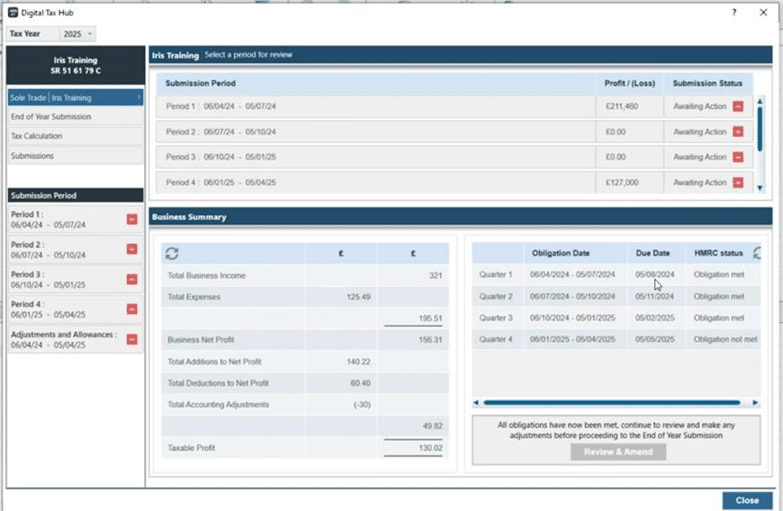
6. Click on the left side on Period 1 or Period 2 etc. Check if the values are correct or need to be edited. If correct then click ‘Finalise’ (a pop will appear) and then ‘Submit’. A Pop up on the top right side will show as submitted and the yellow round symbol on left side will change to a green tick (may take a moment for this change). Note: There is no receipt/confirmation email from HMRC, there is just a green tick against it and use the ‘Submissions’ tab on left side (choose ‘Current’ or ‘Previous’ Submissions)– to see records on what is sent or not and keeps track of it. Do this for all 4 quarters based on their deadlines. If the status says ‘REJECTED’ then go to option ‘Previous submissions’ then you can find the rejection and reason for rejection.
Note: Once clicked ‘Finalised’ – It will lock in and stop any further editing of manual income/expenses values (the boxes which you can normally access are now greyed out). You will need to click ‘reset status’ which allows editing of values again.
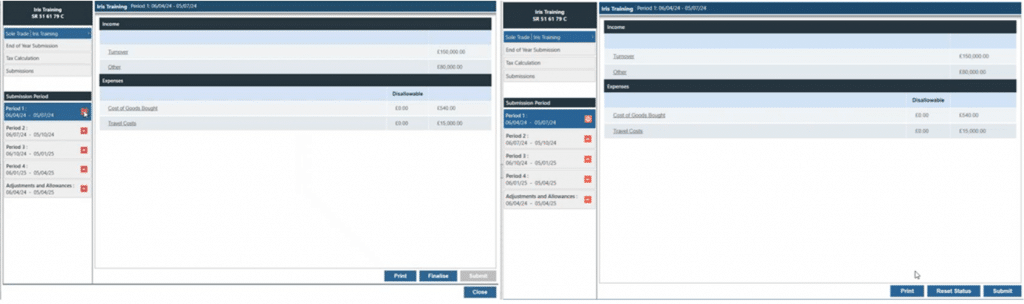


7. HMRC allows you to send amended values for quarters (Within the HMRC timescales), correct the values and submit again and it will supersede the original submission. See step 11.
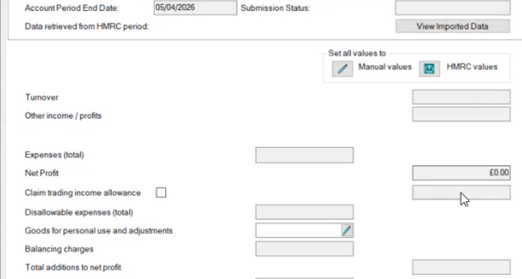
8. 2025/2026 onwards changes to data entry. When the quarters are all completed in 2025 then change year to 2026, the income/expenses boxes may now be blocked as users CANNOT manually enter values directly (The Income Boxes etc are greyed out, see below for sole trade). HMRC do not want users to enter values directly into PT like before, it must now come from a EXCEL/CSV source and use the IMPORT tool. This lock out of the income/expenses entry is triggered by the MTD registration date entry in PT (Admin/edit tax return dates/ MTD registration date) and follows this HMRC rule.
Client is not required to do MTD quarters in 2026 but cannot manually enter data for property? This lock out of the income/expenses entry is triggered by the MTD registration date entry in PT (Admin/edit tax return dates/ MTD registration date). To unlock the property screens, load the affected tax year eg 2026, remove the MTD reg date, save. At the top of PT: Change year to the next tax year eg 2027, now enter in the MTD reg date, save. This will now only lock out the 2027 tax year screens and NOT affect 2026 – you can now enter data again for 2026.
Note: Only enter a MTD reg date in the correct Tax Year. For example a date of 05/04/2026 should only be entered in the 2027 tax year (and not 2026 tax year – at the very top of TP, find the year selector). If you enter the reg date in the wrong tax year, it may lock out the income/expense boxes and stop all manual entries for the wrong tax year.
Warning: To enter 2026 values into a 05/04/2026 period then use the IMPORT tool. Do not change year to 2025, then open the 05/04/2026 and manually enter values into each quarter and avoid the import tool. This may cause incorrect calculations to show in 2026. If this needs to be corrected, delete the 05/04/2026 period completely (click NEW at very bottom), restart PT, add back the period 05/04/2026. Change year to 2026 and retrieve the periods again and use the IMPORT tool.
9. Close the (Trade) Gross Profit screen and go to the very bottom of the screen – Users can only use a new ‘Import postings‘ button and ‘IMPORT FILE’ at the top tool to import a csv file. You can use set import csv/excel templates, click on SETTINGS on bottom left and IRIS import templates or go to this template link or the MTD help the site here click Personal tax and then MTD. Open the relevant IRIS Excel file – type in the RENT value and the relevant Expense types under the ‘IRIS Category’ with their dates, then save as a EXCEL and also as CSV file and close it.
If a Property type – on the summary screen, on the right of FHL property options – Other property options – select ‘Import from File’. If the property income is shared between 2+ people then ensure the quarter import has the clients correct share of the profits/expenses etc. If the income values is coming from another source and already set up the % split between partners in PT then MTD quarters should pick up the split of values.


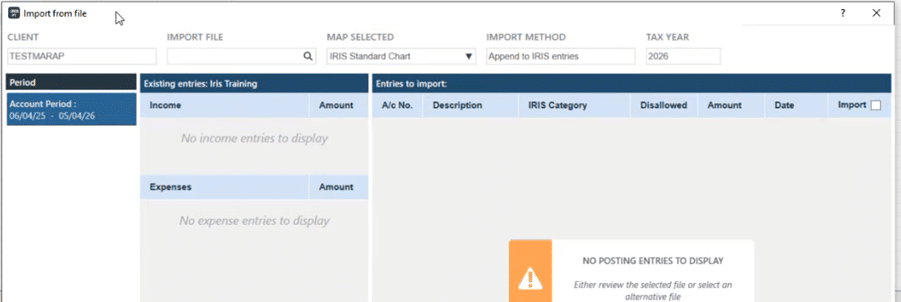
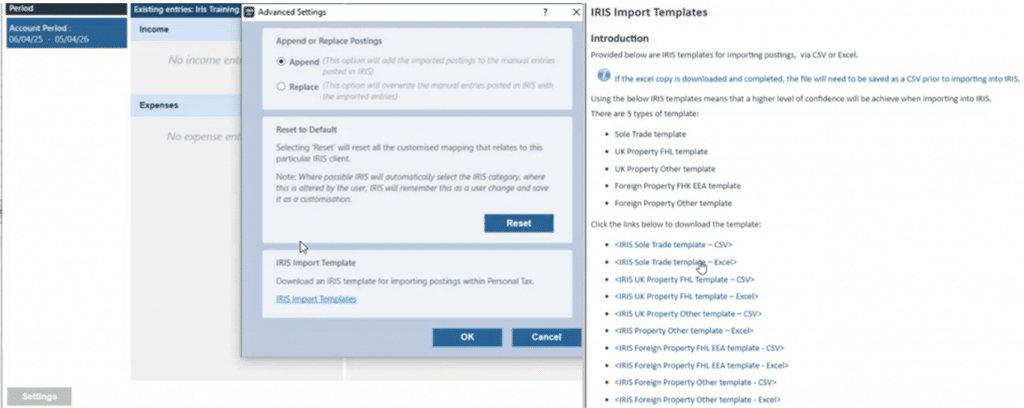
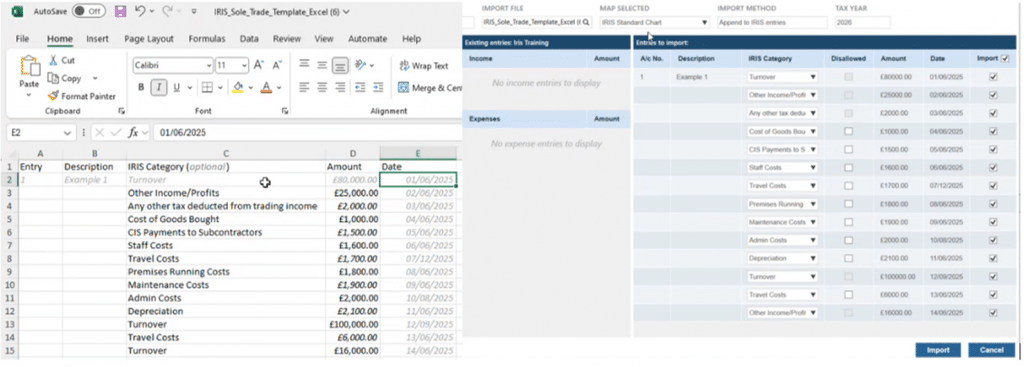
10. Ensure the Excel entries are saved as a CSV file, then import the CSV data into PT. The values now show in a summary screen to allow a final check before importing (this also allows changing of a category). If correct now click IMPORT. The data will be transferred into PT for the relevant periods sole trade. Exit the import screen so on the main PT screen – on the TOP RIGHT click the icon: ‘Digital Tax Hub’ and it will now show the Trade or property on left side tab- click the trade name or property and the data will appear in the relevant quarter to allow you to check, finalise and submit.
When importing a CSV file for the Quarters get a error? Review the original excel/csv – its because it may have a empty 2nd row at the very top below the headers (the empty space example is shown below on left side – the ‘greyed out row’ counts as a empty space. Your instinct is to ignore the greyed row) – just make sure that top space is filled in (eg move everything up one row) and that stops the error as its warning you theres a empty row etc
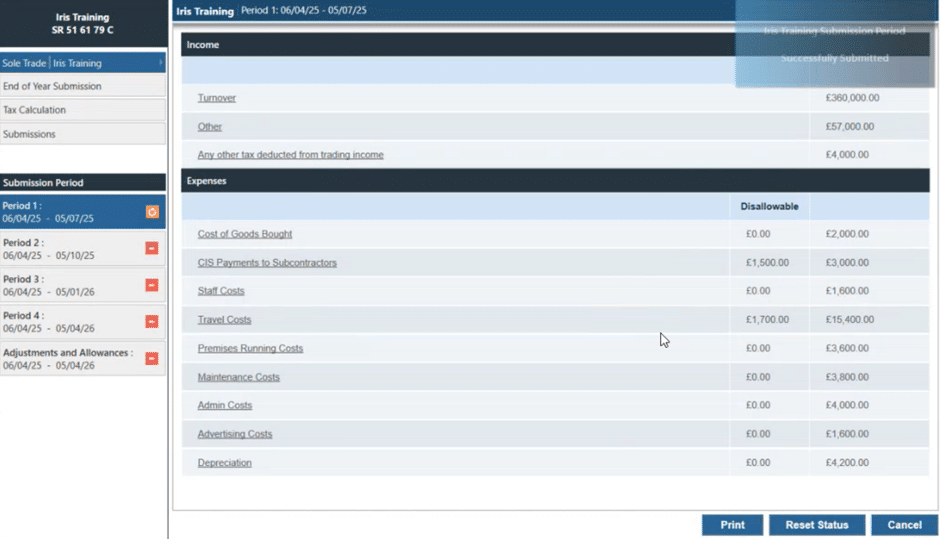
11. In MTD, when you have selected a period which you have already finalised/submitted and need to make amends or fix a incorrect calculation etc. Click ‘Reset Status’, this will remove the cumulative auto adding up lock and allow the edit the imports again for this quarter period. When you click ‘Reset Status’, and go back to the DTH summary screen of all the quarters – it will be showing the relevant quarter Submission Status: ‘Awaiting action (red minus)’ as the expected result (if its not this status then reset it once again)

12. UK Property and Foreign Property income rules? This uses slightly different rules compared to Sole trader. Once signed in with ASA go to UK Property: UK Land and Property | UK Other Property Summary | Period Settings OR Foreign Property: Foreign | Foreign Other Property Summary | Period Settings. Click ‘Retrieve periods from HMRC’. The quarter periods should show.
You will make manual entries as per normal into PT with their dates and then go to MTD Hub, select the property option and it will list the quarters. Do note this manual entry can be restricted/blocked from a later IRIS version update (Date TBC) and would then require CSV imports and will block manual entries. You do not need to make separate quarterly submissions PER property it has to be ONE single entry which is adding up all the properties rent/expenses etc.

What are the ‘Status types’? 1. Awaiting Action, 2. In Progress, 3. Approved, 4. Rejected. If you use the ‘Reset Status’ option for a specific quarter it will change the status to ‘Awaiting Action’.
Reasons why submission was REJECTED: If the status says ‘REJECTED’ then go to option ‘Previous submissions’ then you can find the rejection and reason for rejection.
Using the PT Datamining tool– Digital tax client list Digital Tax/Digital tax client list/ The PM Datamining tool will load – do wait if your client list is long. If you are new to this datamining tool then on the top right- click ‘Select an IRIS search’ – These are default report filters built to help with identify clients. Such as income greater or less then 30K etc. Select the relevant option, let it process it and it will load the clients details. The majority of the reports are designed to look at the PRIOR years data and not in the year you are in now. For the PM guide as well
Note: There is a random issue in 2025 where the MTD reporting in PT is not picking up the correct income data OR its omitting clients when they should be listed (Eg You request sole trade income more then 30K from last year but the persons name is not listed on the final report). If you looking at prior year – go back to the prior year and run a ‘FINAL Tax computation’, then change to the latest year and run the MTD report again and it will pick up the data (A ‘final tax comp’ is needed to refresh the data)

HMRC login screen keeps appearing requesting my login information or get Client or Agent not authorised warning? When you try and access the Trades or Property screens you get the login/warning. Go to Administration and Edit Tax Return dates. In the ‘Registered for MTD’ field- if you have a date entered here, whenever you try and access trades and property screens – it may load the HMRC login screen or you get a ‘Failed auth/client or agent is not authorised’. This is because PT is now trying to automatically link to HMRC to allow quarterly returns – you can either read the rest of the KB to set up your ASA correctly (it may not have been set up correctly and causing the not auth warning) OR remove the date under ‘Registered for MTD’ field (keep that date saved outside of IRIS) which stops the link to HMRC. The HMRC MTD system will use the clients ‘NI code’ to match data so check the NI code saved in Personal tax, if they do not match then you may get the client/agent not authorised warning.
NOTE: ‘Registered for MTD’ field is also used on the preset MTD reports when you request ‘All clients registered for MTD’ – if its filled in with a date. If no date then this client is omitted.

The MTD quarter periods do not appear for the client? If they do not appear in the expected areas in the above steps (TPV summary screen or the Digital Tax hub) and you do not get any errors appear. 1) Check your ASA login, and have you registered your client correctly on the HMRC site and in PT 2) Reset your ASA login under the Authorised agents screen and login again with your ASA login. Incorrect setup of ASA and clients MTD setup may cause the periods to not appear. Read the FULL Guide here
Imported values into the incorrect period, how do I correct it? You have 2 options: 1) Access the period | select the ‘Imported postings’ option and delete one by one. 2) You can import data again but within the import screen | select settings | change the import method to replace | this will replace the already imported postings.
Imported values but it replicates the same values into the other periods? For example – you enter £20,000 into the 1st quarter – this 20K replicates it self into the other quarters etc. This is by visual design agreed with HMRC – periods are a shown as a ‘cumulative’ – once you import the 2nd quarter etc you will see the change. This is also explained on step f) at the top of this KB.
General queries on MTD
1. Are there any future updates in the pipeline that will deal with joint rental income? Answer: IRIS leverages the existing jointly held rental income which has already been incorporated into MTD
2. Are there any future updates in the pipeline that will deal with joint interest income? Answer: IRIS leverages the existing jointly held rental income which has already been incorporated into MTD
3. If one spouse is mandated to MTD and the other in in Self-assessment can joint income be entered once only? Answer: As the MTD solution has been built in parallel to SA existing jointly held functionality will be leveraged and will direct the income to the correpsonding area whether that be MTD or SA for each spouse.
4. Does the dividend data base work with The MTD offering? Answer: Yes this continues to work
5. Does Iris offer any non-bridging software? Answer: We have an IRIS Kashflow/Cashbook solution (Cashbook is free to our IAS Tax users dependent on license limits)
6. The demos seem to imply that data could be manually input into excel and converted to a CSV for upload. Is this deemed to be digital? Answer: HMRC does in fact accept excels as digital record keeping and IRIS has functionality to consume transactional data electronically which passes digital link rules and so yes this is acceptable
7. Why is the MTD period showing incorrectly (eg 6 April 2025 to 5 January 2026)? This is a HMRC decision: When the user retrieves period data from HMRC, the period returned is based on HMRC’s cumulative reporting structure, NOT the full tax year.
HMRC does not return data up to the end of the tax year (5 April) unless the taxpayer is already in that period.
Instead, HMRC returns: Start date: the start of the tax year (always 6 April), and End date: the end of the current quarterly update period that the taxpayer is currently in.
This means the end date changes depending on when the retrieval is performed: So if a retrieval is triggered today 19 November 2025, HMRC considers the user to be in Quarter 3, so the cumulative period it returns is 6 April 2025 to 5 January 2026, once the date passes 5 January 2026, the same retrieval will return 6 April 2025 to 5 April 2026 because the client will then be in Quarter 4, which is the final cumulative period of the year.
Get error: INVALID REQUEST- BUSINESSES ID IS BLANK. When clicking ‘Retrieve periods’. Click on the button from the ‘Period Settings’ screen, you would have to select the correct business from the “Unmatched record screen” and Click OK. This will match the trade with your client and HMRC MTD.

If you then get a CLIENT OR AGENT NOT AUTHORISED. 1) Check your ASA login, and have you registered your client correctly on the HMRC site and in PT 2) Reset your ASA login under the Authorised agents screen and login again with your ASA login. Incorrect setup of ASA and clients MTD setup may cause the periods to not appear.
How to access the Rejection reports for quarter submissions? Answer: Go to Submissions (on left side) / previous submissions / it will list every submission sent or rejected – open the relevant row to see the report
Why it shows income data even tho there is no data imported? (in the DTH screen on the bottom middle) Answer: This is what HMRC have received in the prior/past for the quarters, (They keep a record on what was submitted even when you have deleted it from PT)

To register for the pre 2025 pilot go here
We are sorry you did not find this KB article helpful. Please use the box below to let us know how we can improve it.