

Business Tax- R&D claim with additional information- Box 650/657
Article ID
business-tax-rd-claim-with-additional-information-box-650-657
Article Name
Business Tax- R&D claim with additional information- Box 650/657
Created Date
27th March 2026
Problem
Resolution
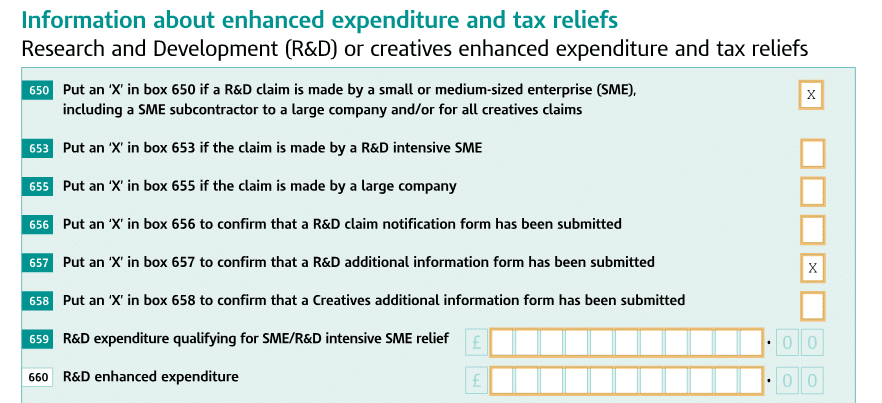
You have ticked the R&D ‘additional information box’ and made a R&D claim (either intensive or RDEC) but when you run the CT600 the boxes 650 and 657 are not ticked.
NOTE: Box 650 is also linked to the SME ‘R&D Expenditure’ Box (And not the boxes ‘adjusted profits’ and ‘660’) – if you have no entry made in there and also ticked the relevant 2 additional info boxes – then 650 will remain unticked. It is designed this way and cannot be overridden unless you enter a valid entry in the ‘R&D Expenditure’ Box. You can test this by entering a entry which to trigger the adjusted profits and box 660 calculations (remove any overrides) and now load the CT600.
Please update to IRIS version 26.1.0 first and check again – if the boxes are still empty try this refresh: Go into ‘Enhanced Expenditure data entry’ screen and change the company size to large, close the screen. Then run a Tax computation. Go back to the ‘Enhanced Expenditure data entry’ and change back to small or medium and run the Tax comp and now run the CT600.
If you are making a claim for RDEC specifically (and not R&D intensive relief) and Box 650 remains blank. This is fixed with the version 26.1.10 in May 2026 OR there is a HMRC schema update planned for 6 April 2026 – when that date arrives then regenerate and submit. If you get a error when submitting (see the data refresh steps below as well) then remove the ticks for additional information (add a note to explain 650/657 should be ticked) and regenerate and submit.
Refreshing of data: If you have updated to 26.1.10 and still have this issue, it needs a refresh of data – please untick the add info box and run the tax comp, now retick the box and run the Tax return again OR Go to the Enhanced expenditure data entry. Change company type to large, close data entry. Reopen it and change it back to original setting. Then run Ct600 return.
If you submit and get this 3001 4065 error then await the HMRC Schema update.

What you want these ticked but the 2 boxes are empty:
We are sorry you did not find this KB article helpful. Please use the box below to let us know how we can improve it.