


Business Tax- How to attach PDF of a IXBRL/Tax comp when generating CT600?
Article ID
business-tax-how-to-attach-pdf-of-a-ixbrl-when-generating-ct600
Article Name
Business Tax- How to attach PDF of a IXBRL/Tax comp when generating CT600?
Created Date
13th October 2021
Problem
IRIS Business Tax: How to attach a PDF version of accounts IXBRL and Tax comp when generating CT600?
Resolution
You have a reason to attach a PDF copy of the Accounts IXBRL copy or a PDF of the Tax comp. (For example the accounts was created by another company, or you have issues attaching the IXBRL)
NOTE: If a Partnership return then it doesn’t require a IXBRL – if you do want to add it, save the IXBRL as a PDF, then when you generate a new return there is a option to manually add attachments and add the PDF.
When generating a CT600 – Business Tax is defaulted to look for the Accounts Production IXBRL copy and it will auto generate a Tax computation. You can switch this off/on.
For the Accounts IXBRL: Load the client and relevant period: Data Entry, Summary – Accounts- tick PDF and select PDF option from the pull down list. Save the IXBRL from AP as a PDF. Generate the CT600 and use the ‘Select External File’ and click the Magnifying glass to find the PDF file and attach it. If you do want to auto attach the IXBRL from AP then untick the ‘accounts attached in PDF format’.

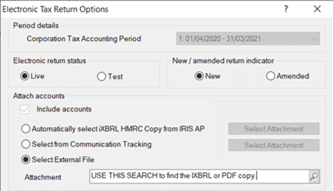
For the Tax Comp: Load the client and relevant period: Data Entry, Summary – Computations- Untick ‘for return period’ and select PDF option from the pull down list. Save the Tax comp from BT as a PDF. Generate the CT600 and use the very bottom ‘Select External File’ and click the Magnifying glass to find the PDF file and attach it.
PDF size limit from HMRC: There is a limit to ANY PDF attachment added to a submission, the PDF has to be below 2MB in size. If you exceed this and submit you may get a error/warning. You will need to edit the PDF to reduce its size and attach the newly updated PDF.
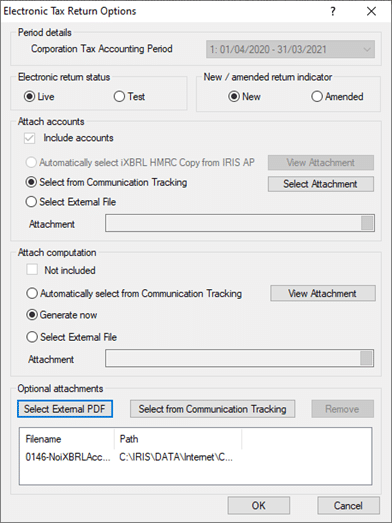
If you get a ‘Page 1 of the CT600’ warning when trying to generate a CT600- go to this link: https://www.iris.co.uk/support/knowledgebase/kb/business-tax-page-1-of-ct600-indicates-accounts-comp-are-attached-so-you-must-attach/
We are sorry you did not find this KB article helpful. Please use the box below to let us know how we can improve it.