


IAS 11711 Practice Management- Data Mining and MTD reports for PT Clients
Article ID
ias-11711
Article Name
IAS 11711 Practice Management- Data Mining and MTD reports for PT Clients
Created Date
26th June 2014
Problem
IRIS Practice Management- How do I access Data Mining? MTD reports for PT Clients 2024/2025
Resolution
IRIS Data Mining is an enquiry tool that will do searches on the IRIS database. You can select the fields you would like to display, and apply one or more queries to find the clients required. With the clients found you can: 1) Save the search criteria. 2) Save the list of clients into a CSV file, this will have the fields you selected. 3) Directly open Excel with the information selected displayed within Excel. 4) Print what is displayed on the screen. 5) With an AutoMail licence, you can use the GPM search criteria to select a group of clients to send a letter to.
Open Practice Management from the IRIS main menu, right click on the ‘PM icon’ and select Data Mining to display the following screen. Alternatively from the Staff Control Panel select Launch | Data
Personal Tax MTD reporting
(This is only relevant from 2024/2025 onwards) Open Personal Tax, load a client, Digital Tax and Digital Tax Client List, it will load the screen below restricted ONLY to Personal tax clients. You may need the Practice Management license in order for additional further reports to be created. If you choose the option ‘select an Iris search’, there is an option to select the search to show for example ‘clients with income over XXXK’. All other reports available in PT are via the reports heading.
Note: There is a random issue in 2025 where the MTD reporting in PT is not picking up the correct income data OR its omitting clients when they should be listed (Eg You request sole trade income more then 30K from last year but the persons name is not listed on the final report). If you looking at prior year – go back to the prior year and run a ‘FINAL Tax computation’, then change to the latest year and run the MTD report again and it may pick up the data (A final tax comp is needed to refresh the data)
Version 25.3.0/25.4.0 issues – There is a known issue where it may not pick up property income correctly if its splits eg 50/50%. So 10K rental, split 50% shows as 5K for client. When you run the MTD report it picks up the whole 10K. This is being looked at by the IRIS Development team. The only workaround: If you have a ‘Practice Management’ license, contact that team and ask if they can create a unique report for you. If you don’t have a PM license then you will need to manually go through the report and note down the clients with shared properties.
The pre-set reports have also been updated , see below: 25.2.0 version list of reports

25.3 version list of reports

Link to the Data mining guide. If you have a PM license you can contact the PM support team via Community.
How to Setup a query?
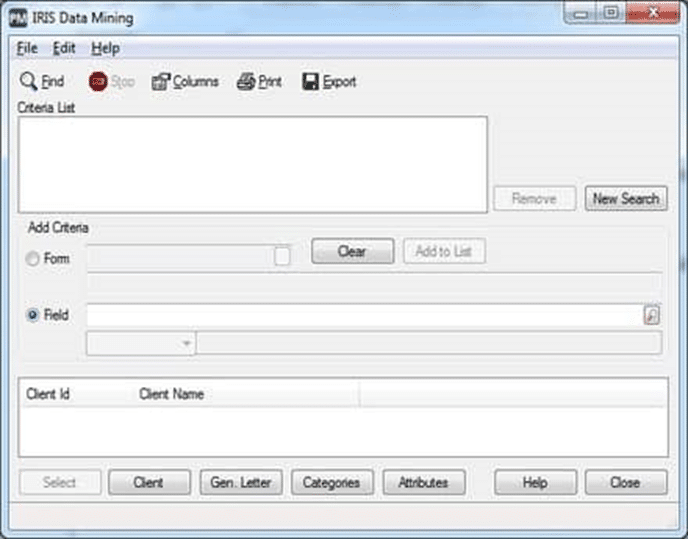
- The top section of the screen labelled Criteria List shows the search criteria you have selected.
- The lower section shows the columns selected and the list of clients found.
- And the buttons along the bottom of the screen to show how the information can be output.
Share This Page


We are sorry you did not find this KB article helpful. Please use the box below to let us know how we can improve it.