


Personal/Trust Tax: Capital gain 2024/25 18/24% rate with Adjustment
Article ID
personal-trust-tax-property-capital-gain-2024-25-18-24-rate
Article Name
Personal/Trust Tax: Capital gain 2024/25 18/24% rate with Adjustment
Created Date
8th April 2025
Problem
IRIS Personal/Trust Tax: Property Capital gain 2024/25 18/24% rate - show an 'adjustment' in box 51/5.17.B/5.37A in PT and Trust tax
Resolution
The new HMRC 18/24% rates is released with version 25.1.0 in April 2025. IRIS Personal Tax and Trust Tax calculates the updated capital gains tax position for 2024/25 considering the change in capital gains tax rates from the Budget 30/10/2024.
Capital Gains Tax Rate changes
Gains on disposals up to and including 29/10/2024 (‘Residential property’ cannot claim 10/20%):
lower rate = 10%
upper rate = 20%
Gains on disposals on and after 30/10/2024:
lower rate =18%
upper rate = 24%
If claiming BADR – 2023/2024 qualifying disposals are taxed at 10% (disposed on or before 5 April 2025). Rate is 14% from 6 April 2025, followed by 18% from 6 April 2026.
NOTE: If you believe the ‘Adjustment’ and CG % rate in Box 51 CG3 is incorrect– read this KB as a known defect
If Capital Gain calc includes BADR(Entrepreneurs Relief) over £1 million and incorrect CG % rate? You will need to manually split the gains on which you are claiming BADR as the PT software does not automatically calculate this (and will show a unexpected CG % rate). So any gain arising in excess of £1 million limit will be a separate entry (where applicable) and the computation and population of the SA108 will be corrected. This year HMRC changes the way Other property, assets and gains section of the SA108 is to be populated which has resulted in gains having to be split to comply with not only the appropriate rate that should be applied but also the new boxes 17.2 – 17.4.
Workaround to edit the CG tax calc- by adding a manual adjustment under the ‘CG tax adjustment’ field to correct the calculation and entering a note into the additional information space under Edit | Capital Assets | Edit | Losses & Other Information. Note this cannot edit the CG Rates % and it only changes the final CG tax calc.
IF the BADR gain is below £1 million then read this KB and the row How to edit the BADR claimed amount (claim more or restrict the 10/14%) as you may have a overridden/manual entry in PT which exceeds the BADR limit and forces a higher % rate then 10/14.

IF Capital Gains Computation shows an ‘adjustment’ Box 51, or disagree with CG % Rate: HMRC have not made the same change to their own calculation that will be done when the tax return is submitted online. Their calculation is run based on the application of the pre-budget rates of 10% and 20% for various asset types. An adjustment is then calculated in respect of those gains made on or after 30/10/2024 to correctly reflect the application of the correct rates of capital gains of 18% and 24% (where applicable). This will mean that the HMRC calculation you will receive will be different than is seen in the Capital gains computation within IRIS, for example gains chargeable at 10% according to HMRC will have the correct rate of 18% in the Capital Gains Computation. The differences, where applicable, will be calculated as an ‘adjustment‘, see below image. This will ensure HMRC charge the correct overall capital gains tax. This has also been tested on the HMRC Test case generator 2024/25 where it gives the same Capital Gains tax calculation as on the PT CG Comp (The Final Capital Gain tax value is identical). Update in October 2025: HMRC updated their CG calculator where it will now match the PT CG calc.
If you still believe the CG tax is incorrect because of the adjustment box 51 entry and the applied tax rate % – this box or the tax rate % cannot be edited BUT you can instead adjust the CG tax calculation directly –by adding a manual adjustment under the ‘CG tax adjustment’ field to correct the calculation, and entering a note into the additional information space under Edit | Capital Assets | Edit | Losses & Other Information.
NOTE: If you believe the ‘Adjustment’ and CG % rate in Box 51 CG3 is incorrect? – then read this KB as a known defect
IRIS calculates the appropriate ‘adjustment’ as required and is shown in PT box 51 CG3 on the SA108 and boxes 5.17B and 5.37A on the Trust Capital Gains pages. Example for an individual SA100
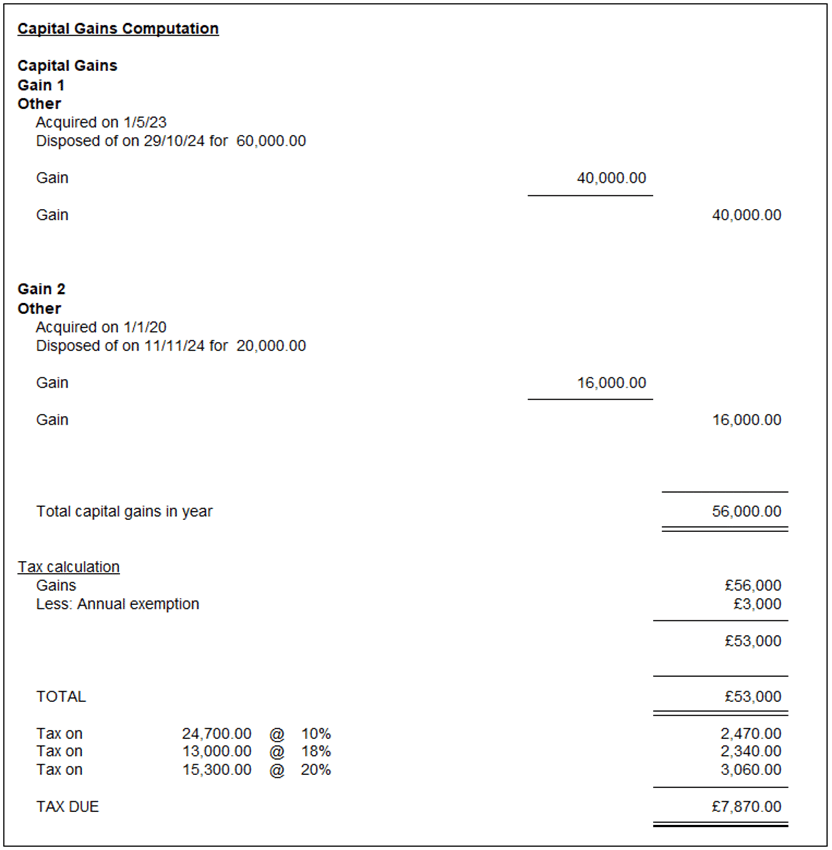
The ‘adjustment‘ is automatically calculated and shown in Box 51. In this example the adjustment Is £13,000 x 8% = £1,040 representing the increased rate of tax applied to £13,000 of the total gains.

We are sorry you did not find this KB article helpful. Please use the box below to let us know how we can improve it.