


Business Tax- Claim Audio-Visual and Video Games Expenditure Credits (AVEC) ‘Expenditure credit’ regime Post 2024/25 Box 541
Article ID
business-tax-claim-audio-visual-and-video-games-expenditure-credits-avec-expenditure-credit-regime-post-2024-25
Article Name
Business Tax- Claim Audio-Visual and Video Games Expenditure Credits (AVEC) ‘Expenditure credit’ regime Post 2024/25 Box 541
Created Date
1st October 2024
Problem
IRIS Business Tax- Claim Audio-Visual and Video Games Expenditure Credits (AVEC ‘Expenditure credit' regime Post 2024/25
Resolution
New CT600P/error 9300 – Read this KB
Original ‘Creative Enhanced Expenditure’ claim (Pre 2024/25 before the changes below)– Read this KB
HMRC Post 2024/2025 rules – Certain ‘creative types’ are moved to a new Audio-Visual and Video Games Expenditure Credits (AVEC) ‘Expenditure credit’ regime which now show Post 2024/25 and are no longer part of the older Pre 2024/25 rules. IRIS Business Tax has been updated to accommodate for changes announced under the Audio-Visual reform, which introduces Expenditure Credits for the following categories:
- Film and Film Animation (2)
- High-End Television and TV Documentary (2)
- TV Animation (1)
- Children’s Television (1)
- Video Games (1)
- This new rule is available from the October 2024 IRIS update version 24.3.0. The expenditure credits can be claimed in respect of expenditure from 1 January 2024. New productions must claim under the expenditure credit regime from 1 April 2025 and becomes mandatory for all productions from 1 April 2027.
- Certain types remain under the old Creative credits system (so you will have both ‘AVEC Expenditure Credit’ and ‘Creative Credits’ systems)
- Optional for users from 01/01/2024
- Also affects periods straddling 01/01/2024- old reliefs to the affected types are removed
- If you get a Error about CT600P or 9300 then read this upcoming KB(TBC)
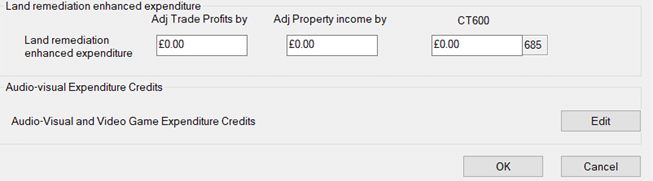
a. New screens: On the left side OR Data Entry Go to the Enhanced Expenditure screen and at the very bottom Audio visual and video games Expenditure Credits and click EDIT
b. Each creative type has its own entry screen on the left side and there are 7 types
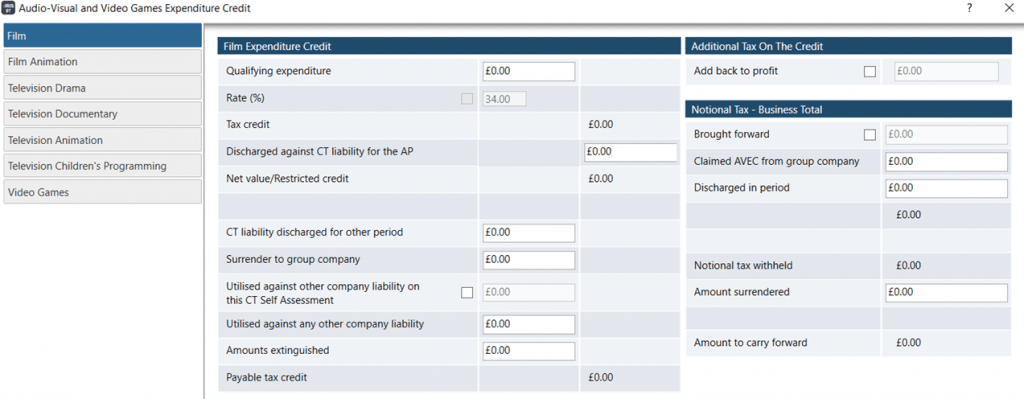
c. The box: Discharge against CT liability for the AP is a manual entry (BT will not auto calculate/fill this in for you). Note: Users should run the tax comp to see the tax liability and then go back and enter in the box: Discharge against CT liability (if its applicable)
d. Tax comp presentation: Each type will show a separate adjustment row on the tax comp if there is a ‘Tax due’. For example if a Video Game Expenditure credit entry was made – it will show as a separate line named ‘Video Game Expenditure credit’ before the Tax overpaid and Tax Payable rows etc.
e. AVEC credits to show on the CT600 and CT600P. Currently they will show on the relevant CT600 boxes eg AVEC Video Game Expenditure credits will show in box 541 (not 885 etc) Please read this KB if you want entries to show on the new CT600P (which is still with HMRC to design in April 2026). HMRC rules:
Box 541 = the amount of credit used to discharge the CT liability eg AVEC.
Box 885 = the actual amount that is payable (non AVEC).
We are sorry you did not find this KB article helpful. Please use the box below to let us know how we can improve it.