

Business Tax- Box L45 must equal the lesser of box L25 and L40. If L25 is not completed then Box L45 must equal 0 (9732)
Article ID
business-tax-box-l45-must-equal-the-lesser-of-box-l25-and-l40-if-l25-is-not-completed-then-box-l45-must-equal-0
Article Name
Business Tax- Box L45 must equal the lesser of box L25 and L40. If L25 is not completed then Box L45 must equal 0 (9732)
Created Date
7th July 2022
Problem
IRIS Business Tax: Box L45 must equal the lesser of box L25 and L40. If L25 is not completed then Box l45 must equal 0
Resolution
This is linked to your RDEC entries.

First ensure you are on the latest IRIS version – help and about and go through the three fixes below
1) Open the RDEC and look at all the values
There may be a £ value difference on the RDEC credit claim (Eg £12372 on the very top middle) compared to all 3 boxes with similar value (eg one may show £12373) – you will need change all so they are the same value (they all need to match or you get the L45 error) . This is caused by users manually overriding all or one of the options on the 3 areas.
NOTE: If you have overridden and made a manual enter in box ‘Discharged against CT liability box for the AP‘ read the 3rd fix
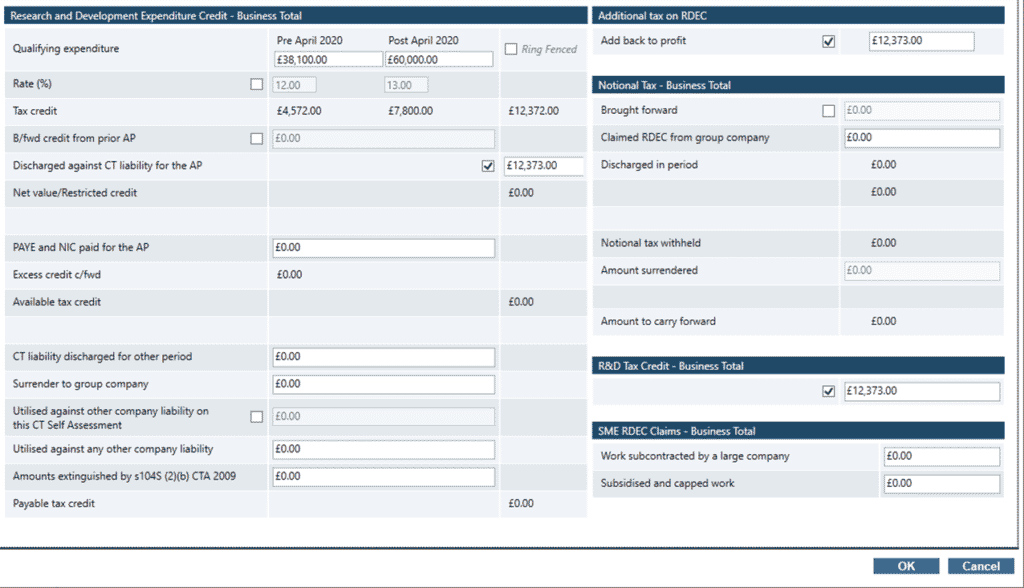
2) If all the values match then it can be a rounding issue: You may have a penny values on RDEC credit calculation eg £1000.71
Can you change the RDEC qualifying expenditure to a figure that calculated the tax credit as a whole figure like £1001 and also ensure all other similar boxes have the same £1001 value.
If you don’t have a RDEC entry but you have R&D entry – make the same edit there as well to the credit claim.
3) You have a incorrect overridden entry. Review your entry under the RDEC box: Discharged against CT liability box for the AP and note down this entry. Remove the override ‘tick’ box and note the automated calculation, is this automated value less then the overridden value you had entered? For example the automated calc is £1000 but you manually entered £1001- If yes then this overridden entry may trigger the L45 error as this is calculating a unfavourable tax calculation for your client (it may suppress the RDEC credit carry forward to next year, run the Tax comp to see the difference it makes). So remove the override OR edit the entry in there, regen and submit.
4) If you have any RDEC entries, there can sometimes be a refresh issue where an automated calculation shows on Page 7 or 8 which should not be shown (like ‘Corporation tax liability discharged for this period £XXX’). One method to remove this calc, go back to the RDEC input screen, just look at it and do not make any edits, then close the RDEC screen and run the Tax comp again and the entry may be removed. If that dosnt work , remove ALL RDEC entries so its blank, run tax comp, go back to RDEC and enter it all back in , run tax comp, if the unknown value shows again then go back to the RDEC input screen, just look at it and do not make any edits, then close the RDEC screen and run the Tax comp again
We are sorry you did not find this KB article helpful. Please use the box below to let us know how we can improve it.